Current customers: sign up by December 4 and use Cool Running AI free through December 31.
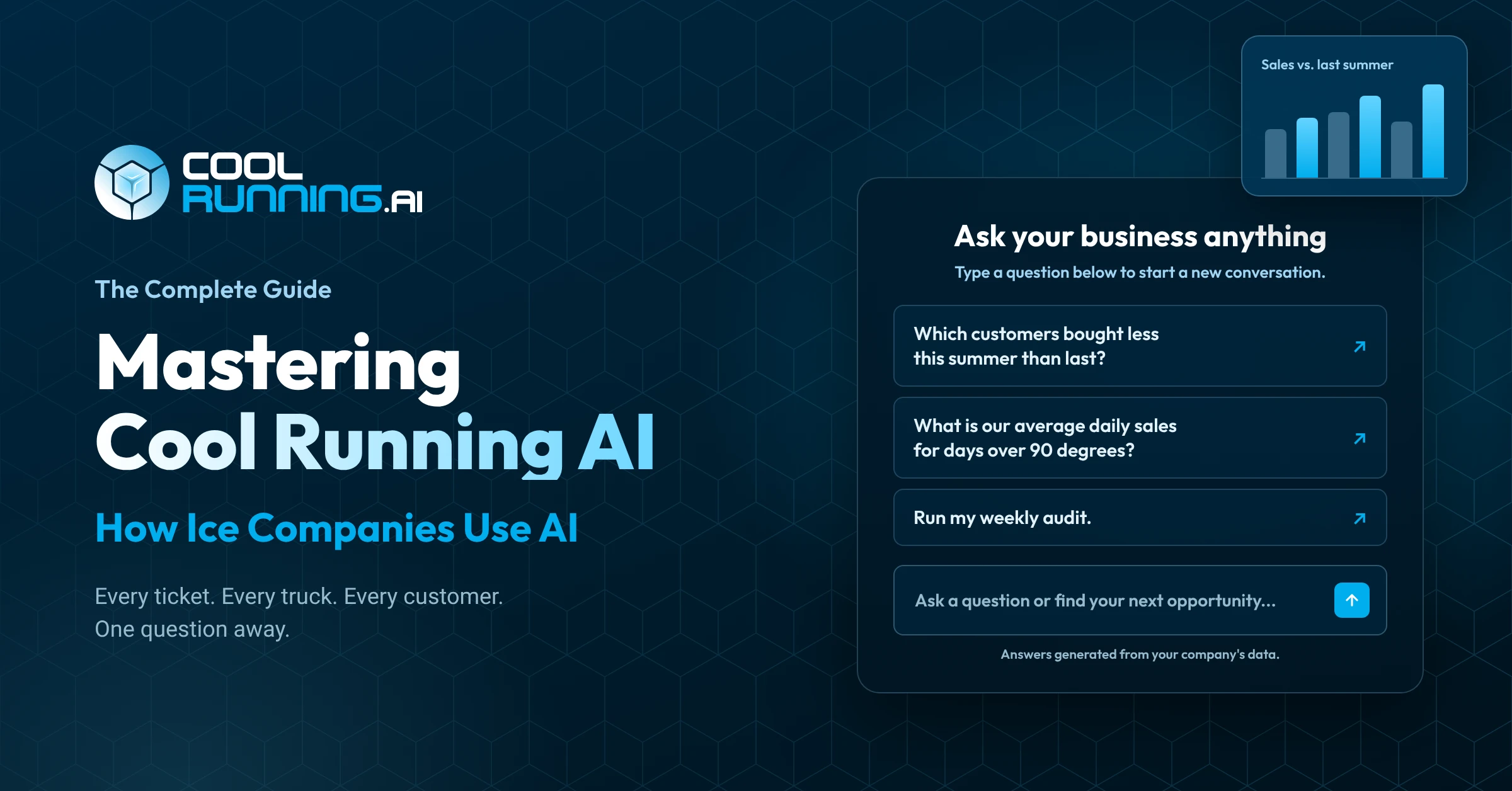
Cool Running AI is the AI business analyst built into Cool Running® Software. Ask a question about your ice company the way you’d type it to a person, and it reads your own Cool Running data and answers with words, a table or a chart. Every ticket. Every truck. Every customer. One question away.
For years, the answers to your biggest questions have been sitting in Cool Running. Every delivery, every stop, every invoice, every merchandiser. Getting them out meant running a report, exporting it and working through it yourself at the end of a long day. Most owners never had the time, or never knew which report to run.
Cool Running AI connects straight to your company’s Cool Running database, so every answer comes from your own records, not the internet. It’s the next step for the ice industry’s most advanced software, and it’s been a long time coming.
Nearly nine in ten businesses now use AI somewhere in their work, and the ones doing it right pull ahead. In the ice industry, doing it right starts with a tool that understands your business. We figured out where AI fits in an ice business, so you don’t have to.
This guide covers how Cool Running AI works, what you can ask, how to get started and how to ask good questions. Then it walks through the daily, weekly, monthly and off season routines. The 15 starter prompts are linked at the end, ready to copy.
Cool Running AI Inside Cool Running
Cool Running AI is built into the platform you already run on. Same login, same data, at app.coolrunning.ai.
When you ask a question, Cool Running AI looks up the records that answer it in your company’s Cool Running data. Then it puts the answer together as a few sentences, a table or a chart. Ask a follow up and it looks again, so every number on the screen comes from your records.
What that means for you:
- It reads your data. It can’t change a thing. It doesn’t create orders, build routes, set prices or send anything.
- It only sees your company. Nobody else’s.
- It tells you when it isn’t sure.
- No new login. If you can sign in to Cool Running, you can use it.
- No reports to build and no spreadsheets to dig through.
For the full product overview, see our page on AI for ice companies.
What You Can Ask Cool Running AI About
Sales. Customers. Routes. Trucks. Merchandisers. Production. Service. Weather. If Cool Running records it, you can ask about it.
Sales
Look at sales by day, week, month or season, and compare any period with the same one last year. Break it down by customer, location, driver, product or payment method. You can also check your surcharges and see who isn’t paying one.
Show my sales by month for this year and last year, side by side.
Which customers are missing a fuel surcharge?
Customers
Find the accounts that are slipping before they’re gone: customers buying less than last season, regulars who stopped ordering, locations that haven’t bought in 60 days and accounts with missing contact details.
Which customers bought less this summer than last?
Routes And Drivers
Compare planned stops with completed ones, find missed and unplanned stops, and see where trucks stop for very little. Measure each driver on stops, bags per hour and sales per hour. To act on what you find, plan your routes with Route Optimization.
Where are we making trips we don't need to make?
Who were my most efficient drivers this month?
Trucks
See what went out on each truck, what was delivered and what came back to the depot. Compare each truck’s time on the road with its sales.
Compare each truck's time on the road with its sales this month.
Merchandisers
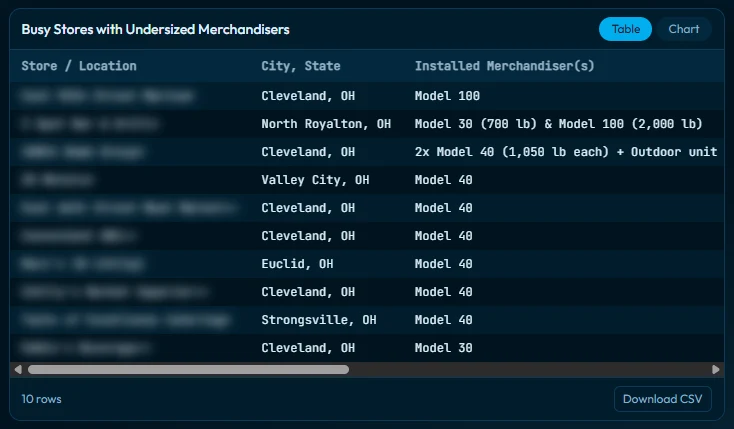
Count what you have in the field and which units carry volume sensors. Read temperature and fill level where sensors report, find busy stores with a merchandiser that’s too small and spot units that are overdue for service. More on tracking your boxes in our merchandiser tracking guide.
Which busy locations have a merchandiser that's too small for them?
Production
Trace a production lot from the bag to every invoice it went out on.
Which invoices did lot [your lot number] go out on?
Service
Check field tasks by location: what’s open, what’s overdue, what’s done and who completed it.
Which field tasks are overdue, and at which locations?
Weather
Weather history where you deliver, side by side with your sales. It gets its own section next.
Weather And Your Ice Sales
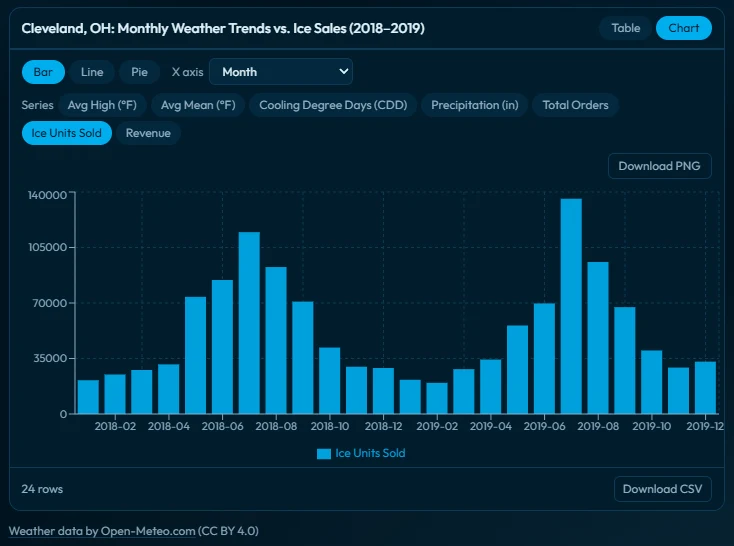
Cool Running AI pulls the weather for the places you deliver, going back to 1940, and lines it up with your sales. You can see exactly how heat and rain moved your business.
Ice runs on weather. Every owner knows a hot week sells. What’s harder to pin down is how much more, which customers jump and whether a slow week was the weather or something you could control. Now you can check, with your own numbers.
What you can look at:
- Daily highs and lows, rain and cooling degree days for each depot location
- Your sales and units on your hottest days compared with an average day
- The customers whose orders go up the most in the heat
- The weeks sales dropped even though the weather was the same or hotter than last year
What is our average daily sales for days over 90 degrees?
Run a heat check on my business.
(Full prompt in the starter prompts)Run a check on whether weather or my business drove my sales.
(Full prompt in the starter prompts)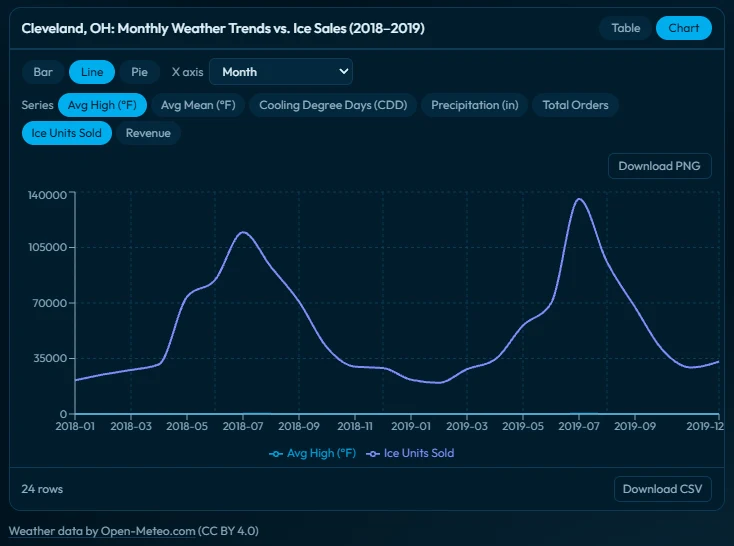
When To Use This (Examples)
- After a slow week: see whether the weather explains it or something on your side does.
- In the off season: see what last summer’s heat waves took in stops, units and trucks.
- Before summer: know which customers to check on first when the heat comes.
Weather in Cool Running AI shows what happened. It looks back at your history, it doesn’t guess at the future. Weather data by Open-Meteo.com.
Getting Started With Cool Running AI
Sign in at app.coolrunning.ai with your Cool Running login. The first admin on your license activates it for the whole company, picks a plan and adds the team.
Who Can Use It
Cool Running AI is for ice companies on Cool Running Software. Not on Cool Running yet? Request a demo and we’ll show you the full platform.
Step 1. Sign In With Your Cool Running Login
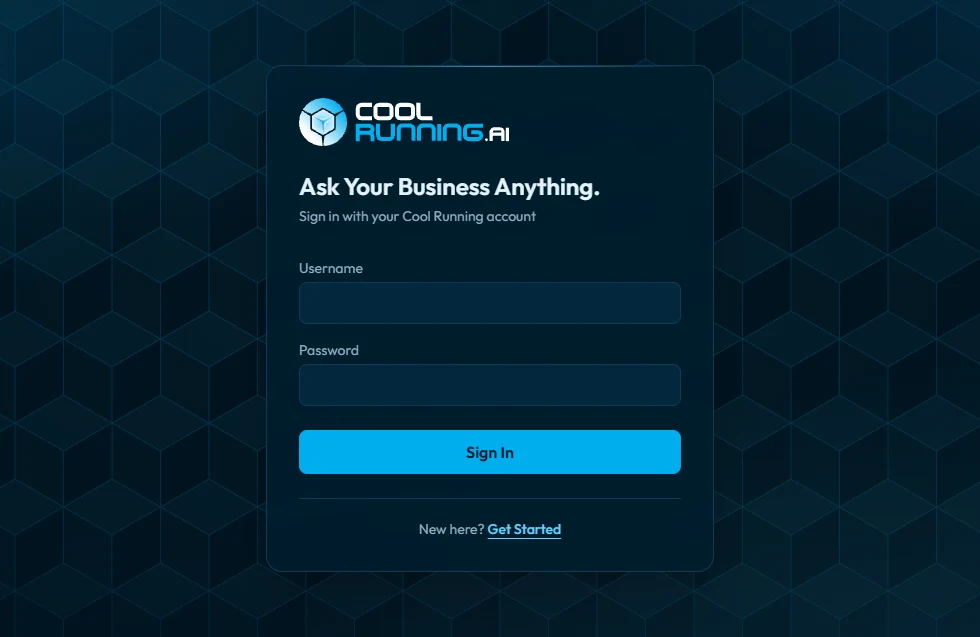
Go to app.coolrunning.ai, or click Sign Up on coolrunning.ai, and sign in with the username and password you use every day. No new password.
Step 2. Activate Once For The Whole Company
The first admin on your Cool Running license to sign in activates Cool Running AI for your company and picks the plan. That person becomes the account owner: the one person who manages the plan and decides who on your team can use it. Ownership can be handed to someone else later.
Step 3. Choose Your Plan
Plans are sized by usage, and the bigger the plan, the bigger your company’s pool. Start where it makes sense and move up any time. An upgrade takes effect right away, and it all goes on your regular Cool Running invoice. You’ll see each plan on the activation screen.
Step 4. Add Your Team
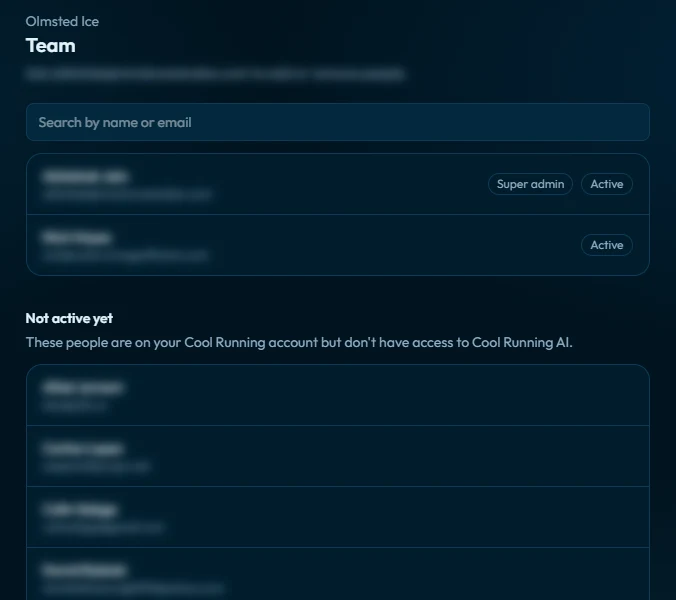
On the Team page, the account owner adds people from your company’s Cool Running user list. Each person you add brings more usage to your company’s shared pool and is billed on your regular Cool Running invoice.
Not The Admin?
You’ll see a note after you sign in. Send your admin to coolrunning.ai and they can activate it for your whole company.
Already on Cool Running? Sign in with the login you already use.
Sign InNew to Cool Running? See the full platform first.
Request A DemoFinding Your Way Around Cool Running AI
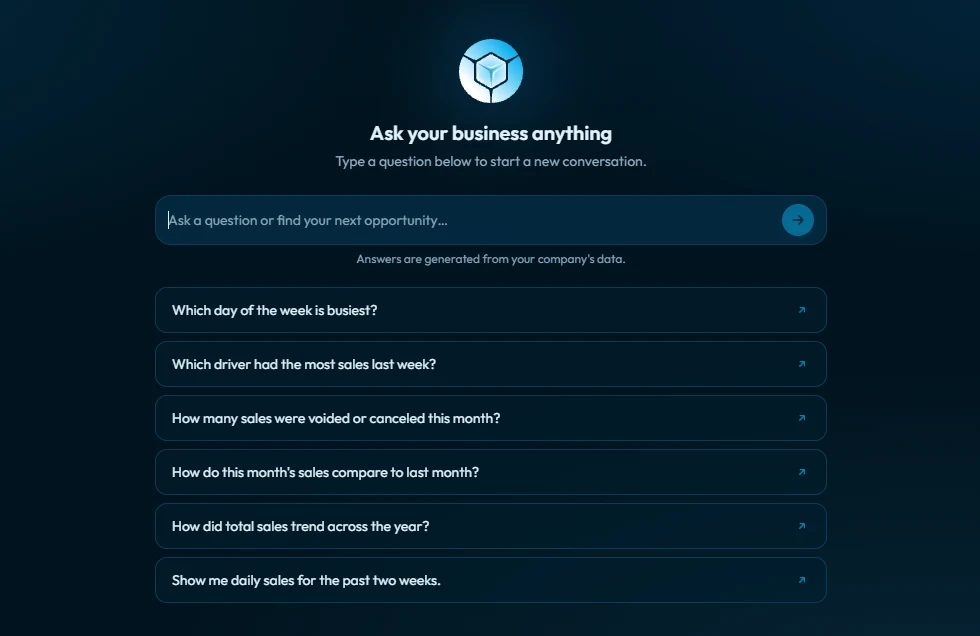
Everything happens on one screen. Pick a starter question or type your own, follow up in the same chat, then export it, pin it or find it again later.
Starter Questions
The home screen shows a handful of starter questions. Click one to see the kind of answer Cool Running AI gives, then change the wording to fit what you need.
When To Use This: your first time in, or any time you’re not sure where to start.
Asking And Following Up
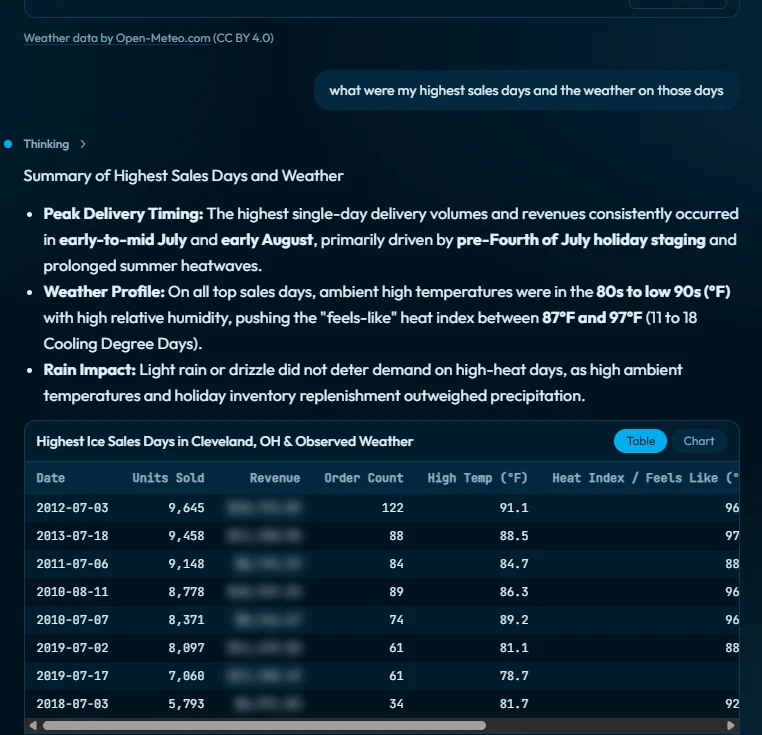
Type your question in the box at the bottom. The answer writes itself out on the screen, and you can stop it if you asked the wrong thing. Then keep going in the same chat. Ask for just the top 10, add a column, or switch it to a chart. Cool Running AI looks up your data again on every follow up.
Now show just the top 10, and add each customer's last delivery date.
When To Use This: narrowing a long list, adding a detail you forgot, or turning a table into a chart.
Tables And Charts
Lists come back as tables. Trends and comparisons can come back as line, bar or pie charts. Ask for the one you want, and download any chart as an image.
Exporting Your Answers
Save a whole conversation as a PDF to print, file or share, and download any chart as an image.
When To Use This: a Monday meeting with your team, a call with your accountant, or a visit to a big account.
Your Chat History
Every chat is saved with its own title. Rename a chat, pin the ones you run every week, remove the ones you don’t need and search by title or by anything said in the chat.
When To Use This: pin your weekly audit so it’s one click away every Monday.
How To Ask Cool Running AI Good Questions
Give it a time frame, tell it what to compare against, follow up in the same chat and start a new chat for a new topic.
- Give it a time frame. This month, last summer, the last 90 days or exact dates.
- Say what to compare with. Last week, the same month last year or the average of the last eight weeks.
- Name what you mean. Customers or locations. Sales dollars or units. Every route or one route.
- Ask for the shape you want. A table of the top 10, a chart by month or a three line summary.
- Follow up in the same chat. It keeps the thread, so you don’t have to start over.
- Start a new chat for a new topic. Answers stay clean, and a long chat uses more usage.
- Tell it what to do when there’s nothing there. “If there’s no data, say so plainly. Never guess.”
- See “Not checked against your data”? Ask again. That note means the figures weren’t looked up, so get them from your records.
A vague question gets a general answer. A specific one gets your numbers.
How are sales?
Compare my sales and units for October with October last year, by customer. Show the 10 biggest drops in a table.
Don't Know What To Ask?
Start with the starter questions on the home screen. Then use the Cool Running AI Starter Prompts: 15 prompts for audits, deep dives, weather and growth. Copy one, paste it into Cool Running AI and run it. You can also download all 15 as a PDF.
Using Cool Running AI Every Day
The ice companies that get the most from Cool Running AI make it a habit: a quick check every morning, an audit every Monday, a deeper look every month and a full review in the off season. Run a full audit of your business in a handful of questions.
Your Assistant: Quick Answers All Day
A customer calls. A driver has a question. You need one number before a meeting. Ask, get the answer and get back to work.
When was our last delivery to [location], and what did they buy?
When To Use This: on the phone with a customer, before a sales call or when a driver needs an answer.
Your Analyst: Digging Into The Why
Sales dropped. A route is running long. Follow the thread one question at a time, in the same chat, until you know what happened.
Which customers bought less this summer than last?
For the top 10 on that list, show how often we delivered this summer compared with last summer.
Your Strategist: Planning The Season
Step back and look at the whole business: where the growth is, which customers and routes to work on and what to fix before next season.
Take a complete look at my business and find my best opportunities for growth.
(Full prompt in the starter prompts)Every Morning: The Daily Audit
Start the day knowing what happened yesterday. The daily audit covers sales against last week and last year, late starts, missed stops, the driver notes worth reading and open field tasks, then tells you the three things to act on first.
Run my daily audit.
(Full prompt in the starter prompts)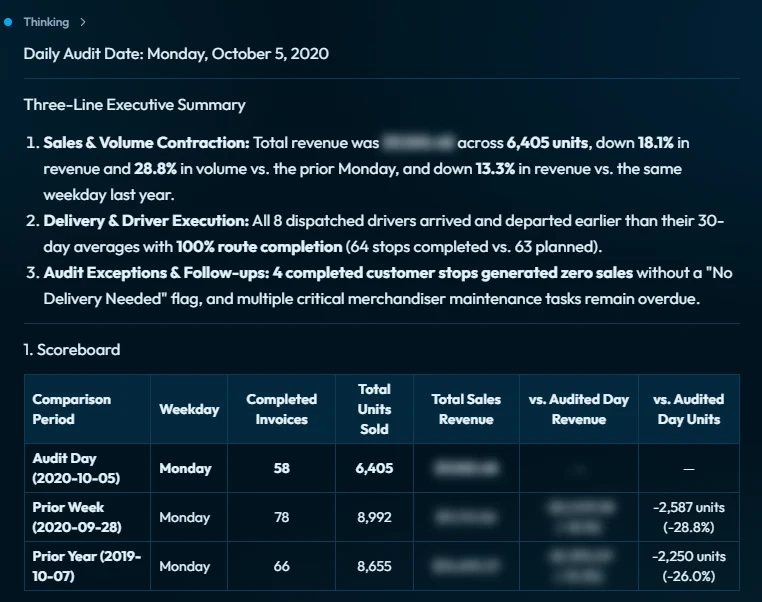
Every Monday: The Weekly Audit
Make it part of your Monday routine. The weekly audit compares last week with recent weeks and shows the customers slipping, the regulars who didn’t order, missed stops, merchandiser drop offs and pickups, and returns and refusals.
Run my weekly audit.
(Full prompt in the starter prompts)Every Month: The Monthly Audit
See your biggest movers against the same month last year, the customers who went quiet, a driver scorecard and your new accounts.
Run my monthly audit.
(Full prompt in the starter prompts)Deep Dives
When one part of the business needs a closer look, run a deep dive. There are six in the starter prompts: customers and locations, products and pricing, drivers, routes and auto schedules, merchandisers and volume sensors. Each one ends with the three things to act on first.
Run a deep dive on my routes and auto schedules.
(Full prompt in the starter prompts)Your Off Season Review
The perfect tool for your off season review. Get to last season’s numbers without the stack of reports. Run the quarterly and yearly audits to see the customers you kept, gained and lost, your biggest accounts and how your drivers and routes held up. Then run the weather check to separate the weeks the weather cost you from the weeks you could have controlled.
Run my yearly audit.
(Full prompt in the starter prompts)Getting Ready For Next Summer
Turn last season’s numbers into next season’s plan. See which customers bought the most in the season ahead last year and haven’t bought lately, what a 90 degree day takes in units and stops, and where you’re leaving money on the table with surcharges, small drops and price gaps.
Find the money I'm leaving on the table.
(Full prompt in the starter prompts)Cool Running AI looks at what already happened. Next summer’s plan is still yours to make, now with your own numbers behind it.
Built For Every Kind Of Ice Company
From the owner who still runs a route to the executive with several locations, Cool Running AI fits the way you work.
- Running the route yourself: Get your answer and get back to the route.
- A local owner with a few trucks: Wear fewer hats without losing oversight of your ice company.
- An owner with a team: Give your team the right tools, so nothing gets left unanswered or left on your desk.
- Several locations: Executive-level insights for every location.
Built for longtime owners and new innovators. See how it fits each kind of ice company on our Cool Running AI page.
What Is Usage In Cool Running AI?
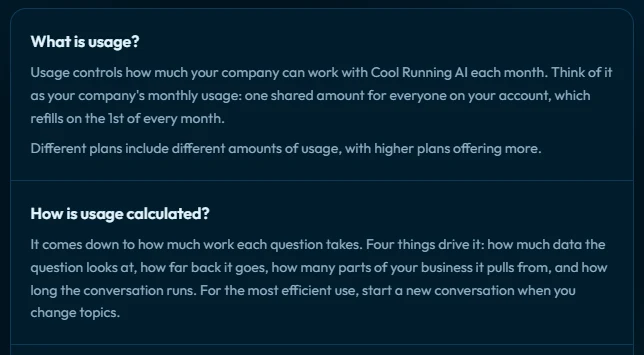
It comes down to how much work the question takes. Four things decide it:
- How much data it looks at
- How far back it goes
- How many parts of the business it pulls from
- How long the conversation runs
A quick lookup on one customer uses a little. A full yearly audit across every part of the business uses more. Your company shares one pool of usage each month, and the usage bar shows how much is left. It resets on the 1st, and the account owner gets an email when you’re running low. Bigger plans give you a bigger pool. The same explanation is in the app under “What is usage?”
Accuracy, Privacy And Trust
Cool Running AI reads your data and can’t change it, it only sees your company, every conversation is logged, and it tells you when an answer includes figures it didn’t look up.
- Read only. The system itself blocks any change to your data. It doesn’t depend on the AI making the right call.
- Your company only. Each company connects only to its own data, and every lookup is checked before it runs.
- Logged. Every conversation is recorded and kept secure.
- Numbers from your records. Tables fill straight from the records it looked up. Follow ups look up your data again. A number you type in is checked against your data, not taken as fact.
- A warning when it matters. If an answer shows figures that weren’t looked up, you’ll see “Not checked against your data.” Ask again to get the numbers from your records.
The Cool Running AI Starter Prompts
Fifteen ready to copy prompts, open to every Cool Running AI user: five audits (daily, weekly, monthly, quarterly and yearly), six deep dives (customers and locations, products and pricing, drivers, routes and auto schedules, merchandisers and volume sensors), two weather checks and two growth checks. Copy one, paste it into Cool Running AI and run it. Each one starts with a three line summary, keeps lists to the top 10 and ends with the things to act on first.
Start Using Cool Running AI
Your data already has the answers. Here’s how to start asking.
Already on Cool Running? Sign in at app.coolrunning.ai with the login you already use, activate for your company and ask your first question.
New to Cool Running? See the full platform Cool Running AI is built on.
Want the prompts on paper? Download the 15 starter prompts. Questions? Email nick@coolrunningsoftware.com.
Frequently Asked Questions
Anything Cool Running records: sales, customers, routes, drivers, trucks, merchandisers, production lots, field tasks and the weather where you deliver. Ask the way you’d type it to a person. Give it a time frame and say what to compare against, and you’ll get your own numbers back.
Click one of the starter questions on the home screen, or run the daily audit from the starter prompts. Both show you the kind of answer Cool Running AI gives. From there, follow up on whatever stands out.
Keep typing in the same chat. Ask for the top 10, add a column or switch to a chart, and Cool Running AI looks up your data again each time. Start a new chat when you change topics.
It comes down to how much work the question takes: how much data it looks at, how far back it goes, how many parts of the business it pulls from and how long the conversation runs. A quick lookup uses a little. A yearly audit uses more.
The usage bar shows how much is left, and the account owner gets an email when it’s running low. The owner can move up a plan any time, and the upgrade takes effect right away. Usage resets on the 1st of each month.
The first admin on your Cool Running license to activate Cool Running AI. The account owner manages the plan and decides who on the team can use it. Ownership can be handed to someone else later.
The account owner adds people on the Team page from your company’s Cool Running user list. They sign in with their own Cool Running login. Each person added is billed on your regular Cool Running invoice and adds usage to your company’s pool.
It means an answer showed figures that weren’t looked up in your records, so they may be wrong. Ask the question again and Cool Running AI will get the numbers from your data.
Yes. Save the whole conversation as a PDF, and download any chart as an image.
No. It reads your data and can’t change a thing. It doesn’t create orders, build routes, set prices or send anything. Your team keeps doing that work in Cool Running the way they do today.