
Add On
Cool Portal
The Customer Portal for Ice Companies
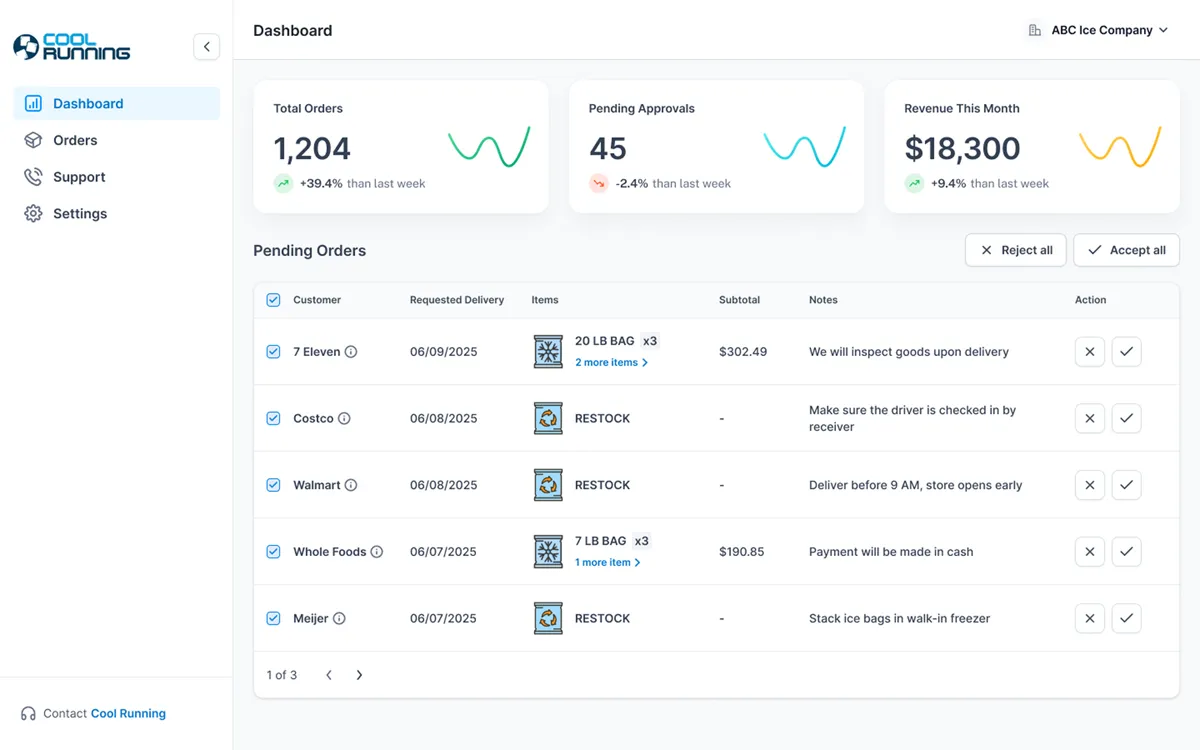
Online ordering for your ice customers. Your recurring customers sign in, see their stores and order ice day or night. Orders reach your office with the details attached, and the ones you accept go straight into RouteBuilder.
New orderStore 12
What do you need?
RestockCustom order
Requested deliveryFriday
Note for the driverBack door before 7
Open24/7 Online Ordering
What Your Customers Can Do
-
Sign Up and Claim Their Stores
-
Place a Restock Order or a Custom Order
-
Track the Status of Each Order
-
Send a Support Request
-
Manage More Than One Store
What Your Office Sees
-
Every Order With Its Details and Notes
-
Accept or Reject Each Order
-
Send a Reason With Your Answer
-
Support Requests in One Place
-
Every Registered Store
-
Turn Off Access When You Need To

From Their Order to Your Office
-
Accepted Orders Go Straight Into RouteBuilder
-
Nobody Types an Order In Twice
-
Fewer Phone Calls and Voicemails to Chase
-
Customers See the Progress of Their Order
-
Works Alongside the Schedules You Already Run
Go Deeper
See Cool Portal at Work
The full guide walks through the dashboard, orders, support requests and what your customers see, with a video for each part.
Already on Cool Running?
Turn On Cool Portal
Tell us you want it and our team will turn Cool Portal on for your account, then walk you through setup and rollout.